Plot RPA data
Show how we can exploit the signals from the Retarding Potential Analyzer/Retarding Field Analyzer.
Set up
Load some libraries
[1]:
import tomllib
import pandas as pd
from pathlib import Path
from pprint import pprint

from multipac_testbench.instruments import RPACurrent, RPAPotential, RPA
from multipac_testbench.multipactor_test import MultipactorTest
Here is a sample of the TOML we will load, with some comments.
[global.instruments_kw.NI9205_ERPA]
caliber_mA = 20.0  # Caliber for the current data; used to rescale the measured signal
class_name = "RPACurrent"
# keyword arguments for the `average_y_for_nearby_x_within_distance` function
# it is used to average RPACurrent values measured at the same RPAPotential
average = true          # Activate averaging
keep_shape = true       # Recommended
max_index_distance = 1  # Averaging is performed on neighboring identical potential values.
                        # Increase it to like 1000 if you want to average over the whole tests
                        # (eg several power cycles)
tol = 1e-6

[global.instruments_kw.NI9205_Spellman]
class_name = "RPAPotential"
See also
Check the documentation of average_y_for_nearby_x_within_distance() for more information on the the averaging arguments.
[2]:
project = Path("../data/campaign_ERPA")
config_path = Path(project, "testbench_configuration.toml")

with open(config_path, "rb") as f:
    config = tomllib.load(f)

results_path = Path(project, "MVE5-120MHz-50Ohm-BDTcomp-ERPA1_1dBm.csv")
Load data. Note that the info key will be appended to plots titles.
[3]:
multipactor_test = MultipactorTest(results_path, config, freq_mhz=120.0, swr=1.0, sep=",", info="1dBm (175W)")
ERROR:root:Your Sample index column does not start at 0. I should patch this, but meanwhile expect some index mismatches.
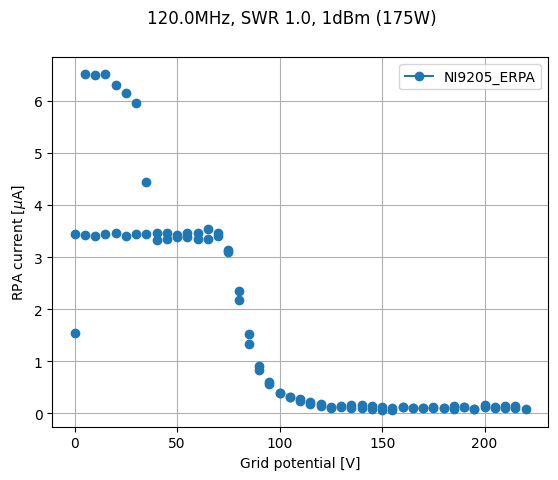
Plot collected current vs grid potential
In this test, RPA Current was measured twice at every potential. This is why we averaged it.
As we want to keep the shape of averaged data consistent with all the other instruments, we introduced NaN numbers for duplicated potential values.
[4]:
rpa_potential = multipactor_test.get_instrument(RPAPotential)
rpa_potential_data = rpa_potential.data_as_pd.copy()
rpa_potential_data.name = "RPA potential [V]"

rpa_current = multipactor_test.get_instrument(RPACurrent)
rpa_current_data = rpa_current.data_as_pd.copy()
rpa_current_data.name = "Averaged RPA current [uA]"


resume_rpa = pd.concat([rpa_potential_data, rpa_current_data], axis=1)
display(resume_rpa[40:50])
| RPA potential [V] | Averaged RPA current [uA] | |
|---|---|---|
| Sample index | ||
| 41 | 5.0 | 6.518785 |
| 42 | 5.0 | NaN |
| 43 | 10.0 | 6.500730 |
| 44 | 10.0 | NaN |
| 45 | 15.0 | 6.513861 |
| 46 | 15.0 | NaN |
| 47 | 20.0 | 6.297208 |
| 48 | 20.0 | NaN |
| 49 | 25.0 | 6.154414 |
| 50 | 25.0 | NaN |
In the above table, you can see that the second measurement point at 5V is NaN.
It is because the first measurement point is now a mean of both points.
[5]:
_, _ = multipactor_test.sweet_plot(
    RPACurrent,
    xdata=RPAPotential,
    marker="o",
)
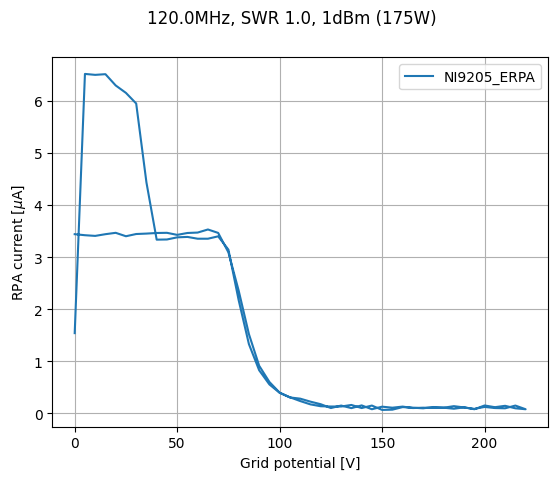
Use the drop_repeated_x argument to force the display of lines anyway.
[6]:
_, _ = multipactor_test.sweet_plot(
    RPACurrent,
    xdata=RPAPotential,
    drop_repeated_x=True,
)
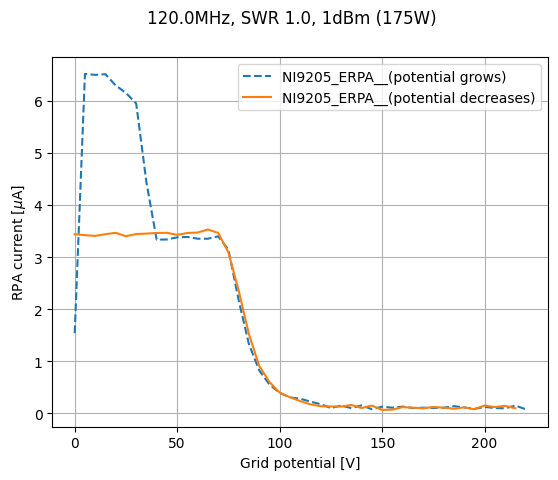
Tip for clearer plots
We start by calculating, for each measurement point, if potential was increased.
[7]:
rpa_potential_growth_mask = rpa_potential.growth_mask(
    minimum_number_of_points=2, n_trailing_points_to_check=0
)
Now we set the masks dictionary. Remember that keys should start with double underscore (__).
[8]:
masks = {
    "__(potential grows)": rpa_potential_growth_mask,
    "__(potential decreases)": ~rpa_potential_growth_mask,
}
And we are ready to plot!
[9]:
_, _ = multipactor_test.sweet_plot(
    RPACurrent,
    xdata=RPAPotential,
    drop_repeated_x=True,
    masks=masks,
)
Plot energy distribution
The RPA object is automatically created when a RPACurrent and a RPAPotential are defined in the configuration TOML.
It holds the electrons energy distribution, directly calculated from the RPA current and potential.
To visualize it, you just need to:
[10]:
rpa = multipactor_test.get_instrument(RPA)
axes = rpa.data_as_pd.plot(x=0, y=1, grid=True, xlabel="Electrons energy [eV]", ylabel="Distribution", title=str(multipactor_test))
_ = axes.set_ylim([-0.05, 0.35])
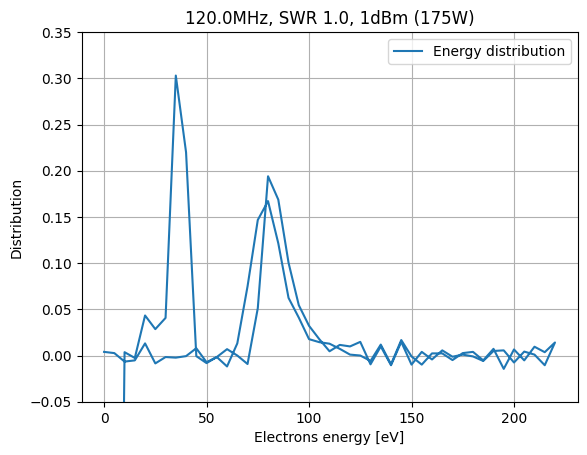
Currently, no dedicated method for this plot. Don’t know yet how I will implement this.
Todo
Integrate to
MultipactorTest.sweet_plot()? Maybe a dedicated method is more suited.Handle increasing/decreasing potentials to avoid superposition of the two distributions.