Load files
Input files format
Here, we cover the fundamental file-loading options. The configuration file options are covered here.
All the files must be in ASCII CSV or XLSX; binary MV files are not supported.
When you have only one or two files to convert from MV to ASCII, perform it with LabViewer.
When you have a whole folder to convert, used the dedicated LabViewer tool.
The different objects
PowerStep: holds a single power step or trigger. Corresponds to the top window in LabViewer.PowerStepSet: holds several power steps. Used to concatenate several triggers in a single file.MultipactorTest: holds a complete test. Corresponds to bottom window in LabViewer.TestCampaign: holds severalMultipactorTest. Used to compare them, produce susceptiblity charts, etc.
Raw files
“Raw” files contain acquisition voltages, in contrary to “non-raw” files holding actual physical quantities.
Use is_raw=True when loading a raw data file to automatically convert acquisition voltages to physical quantities.
Note
The conversion is realized thanks to the transfer functions defined in transfer_functions.
The function parameters are defined in the configuration file.
Hint
It is always better to export raw data files from LabViewer. This way, you will have much more control on the post-treatment.
Example
[1]:
from multipac_testbench import PowerStep
from multipac_testbench.data import config_path
from multipac_testbench.data.power_steps import power_step_example
from multipac_testbench.instruments import FieldProbe
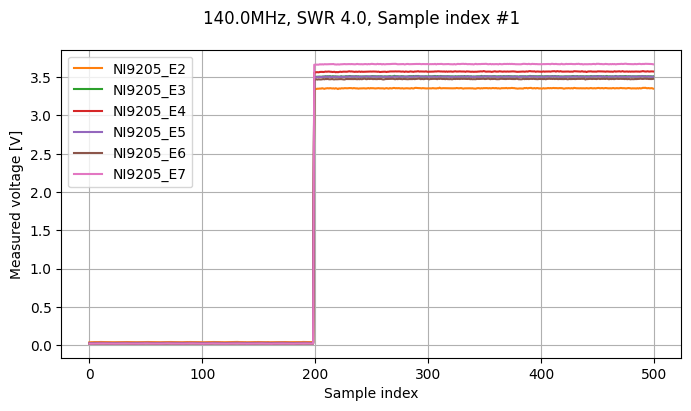
We load a trigger raw data file, without declaring it as raw. All the signals are between 0 and 10 because they are acquisition voltages, not actual physical quantity.
[2]:
raw = PowerStep(power_step_example, config_path, freq_mhz=140.0, swr=4.0, sample_index=1)
_ = raw.sweet_plot(FieldProbe, figsize=(8, 4))
/home/placais/Documents/simulation/python/multipac_testbench/src/multipac_testbench/util/physics.py:28: RuntimeWarning: invalid value encountered in sqrt
  reflection_coefficient = np.abs(np.sqrt(reflected_power / forward_power))
Note
The error message appears because we automatically create some VirtualInstrument.
Some of them rely on Instrument data beeing positive, superior to another, etc.
This is not always the case, especially when working with raw data.
You can provide create_virtual_instruments=False to avoid this.
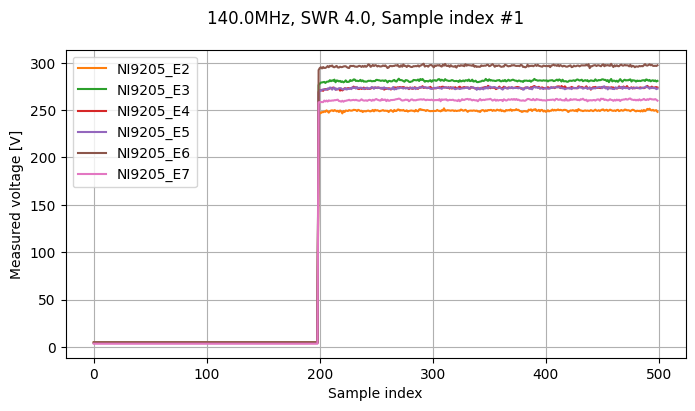
Now with is_raw=True, we will have actual physical data:
[3]:
treated_raw = PowerStep(power_step_example, config_path, freq_mhz=140.0, swr=4.0, sample_index=1, is_raw=True, create_virtual_instruments=False)
_ = treated_raw.sweet_plot(FieldProbe, figsize=(8, 4))
Trigger policy
This option lets you control what to do when several consecutive triggers are measured at the same power.
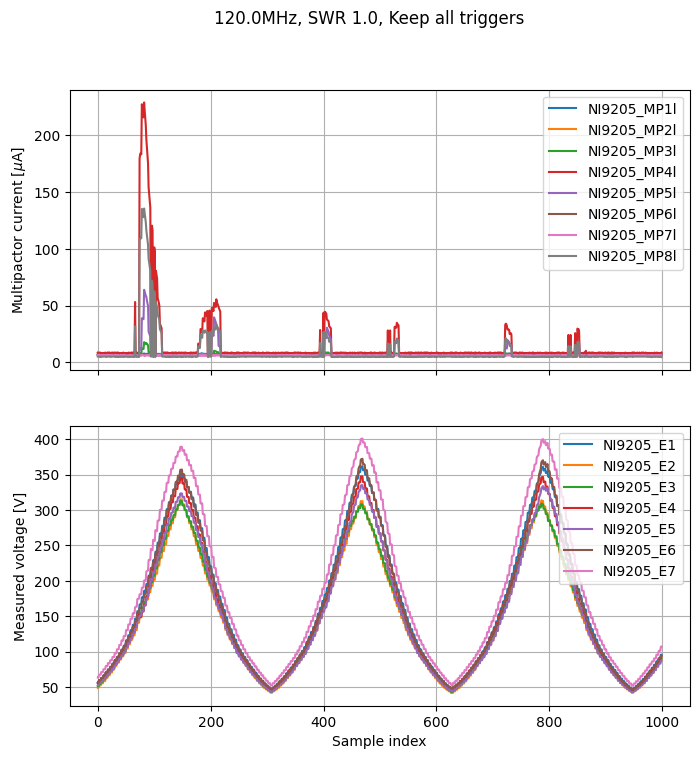
The default is trigger_policy="keep_all", which will keep all the measure points.
It can result in “staircase”-like plots, and can mess with the multipactor Threshold detection.
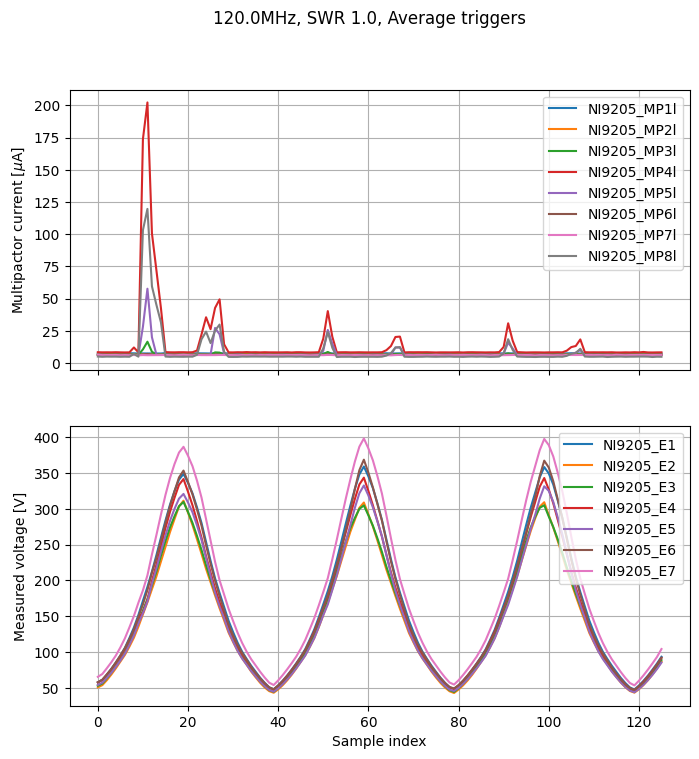
It is recommended to use trigger_policy="average", which will average all consecutive signals with the same input power.
Note
It is more robust to load raw files, because the average will be performed other acquisition voltages instead of physical quantities (the relation between them is not always linear!).
Example
[4]:
from multipac_testbench import MultipactorTest
from multipac_testbench.data import config_path
from multipac_testbench.data.multipactor_tests import test_120MHz_SWR1_4
from multipac_testbench.instruments import CurrentProbe, FieldProbe

to_plot = CurrentProbe, FieldProbe

keep_all = MultipactorTest(test_120MHz_SWR1_4, config_path, freq_mhz=120.0, swr=1.0, info="Keep all triggers", is_raw=True)
_ = keep_all.sweet_plot(*to_plot, figsize=(8, 8))

average =  MultipactorTest(test_120MHz_SWR1_4, config_path, freq_mhz=120.0, swr=1.0, info="Average triggers", trigger_policy="average", is_raw=True)
_ = average.sweet_plot(*to_plot, figsize=(8, 8))
/home/placais/Documents/simulation/python/multipac_testbench/src/multipac_testbench/util/physics.py:28: RuntimeWarning: invalid value encountered in sqrt
  reflection_coefficient = np.abs(np.sqrt(reflected_power / forward_power))
/home/placais/Documents/simulation/python/multipac_testbench/src/multipac_testbench/util/physics.py:28: RuntimeWarning: invalid value encountered in sqrt
  reflection_coefficient = np.abs(np.sqrt(reflected_power / forward_power))
Concatenation of power step files
When LabViewer concatenates all the power step (trigger) files to a single test file, the recorded signal is the maximum of every power step. This sometimes lead to unphysical results, in particular when the current probes detect a quickly-vanishing burst of electrons at the start of the power step.
Instead, it is advised to recreate the test file yourself. It will let you average the power step files, instead of taking their maximum.
Convert all the
MVtoCSVusing the LabView toolCreate a
PowerStepSetfileGenerate a
CSVfile that you can load withMultipactorTest.
Example
[5]:
from functools import partial
from pathlib import Path
import tempfile

from numpy.typing import NDArray

from multipac_testbench import MultipactorTest, PowerStepSet
from multipac_testbench.data import config_path
from multipac_testbench.data.power_steps import power_step_set_example
from multipac_testbench.multipactor_test.helper import take_median

power_step_set = PowerStepSet(
    power_step_set_example,
    config_path,
    freq_mhz=140.0,
    swr=1.0,
    are_raw=False,  # recommended, in order to keep the output file raw
    create_virtual_instruments=False,
)
Now you can create a MultipactorTest file and reuse it.
[6]:
def average(raw_data: NDArray) -> float:
    """Return average over last 100 points."""
    return take_median(raw_data, first_index=-100, last_index=-1)

def average_for_power(raw_data: NDArray) -> float:
    """Return average over last 40 points.

    Use it for Power signals, which are shifted wrt other signals.

    """
    return take_median(raw_data, first_index=-40, last_index=-1)


#  In the real life, provide a real CSV path, not a tmp one
with tempfile.NamedTemporaryFile(suffix=".csv") as tmp:
    csv_path = Path(tmp.name)
    power_step_set.to_multipactor_test_file(
    csv_path=csv_path,
    reducer=average,
    special_reducers={
        "NI9205_Power1": average_for_power,
        "NI9205_Power2": average_for_power
    },
    )

    # Re-use it
    multipactor_test = MultipactorTest(csv_path, config_path, freq_mhz=140.0, swr=1.0, is_raw=True)
/home/placais/Documents/simulation/python/multipac_testbench/src/multipac_testbench/util/physics.py:28: RuntimeWarning: invalid value encountered in sqrt
  reflection_coefficient = np.abs(np.sqrt(reflected_power / forward_power))
ERROR:root:column_header = 'NI9205_E1' not present in provided file. Skipping associated instrument.