Plot signals measured by the instruments
This notebook showcases how basic plots of instrument signals can be produced.
Load data
Load libraries :
[1]:
from multipac_testbench.multipactor_test import MultipactorTest
import multipac_testbench.instruments as ins
Set path to config and results files :
[2]:
from multipac_testbench.data import config_path
from multipac_testbench.data.multipactor_tests import test_140MHz_SWR4_11

results_path = test_140MHz_SWR4_11
Note
In a real life example, results_path should be the path to a test file, CSV or XLSX. The simplest way to create one is through LabViewer.
Similarly, config_path should be the path to your test bench configuration file. See dedicated documentation
Now the MultipactorTest holding the test can be created with:
[3]:
multipactor_test = MultipactorTest(results_path, config_path, freq_mhz=140., swr=4., sep=',', is_raw=True)
ERROR:root:column_header = 'NI9205_E1' not present in provided file. Skipping associated instrument.
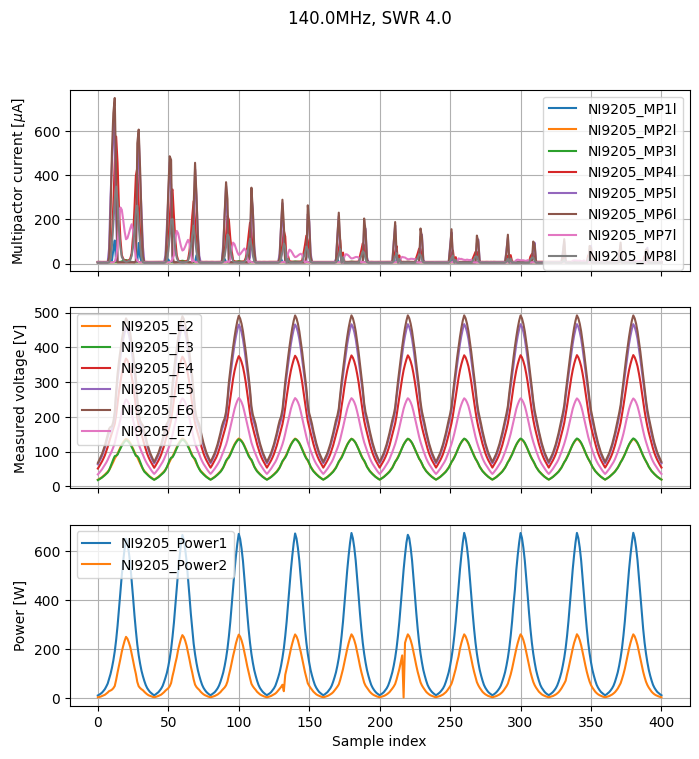
Plot signal measured by instruments
[4]:
to_plot = (ins.CurrentProbe, ins.FieldProbe, ins.Power)
figsize = (8, 8)
_, _ = multipactor_test.sweet_plot(*to_plot, figsize=figsize)
Show all instruments that can be plotted
The full list of Instrument can be visualized with:
[5]:
ins.__all__
[5]:
['CurrentProbe',
 'IElectricField',
 'FieldPowerError',
 'FieldProbe',
 'ForwardPower',
 'Frequency',
 'Instrument',
 'OpticalFibre',
 'Penning',
 'Power',
 'PowerSetpoint',
 'Reconstructed',
 'ReflectedPower',
 'ReflectionCoefficient',
 'RPA',
 'RPACurrent',
 'RPAPotential',
 'SWR',
 'VirtualInstrument']